
Unit Converter - Unity1.2 - Google Play
You'll be able to see results in few seconds.
Publisher Description
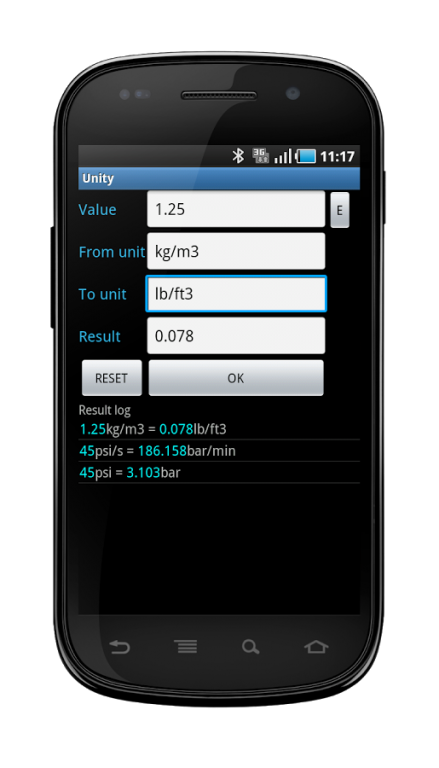
Unity is an application that allows the conversion of most of the SI, US & UK units for use in the engineering calculations (i.e. no currency conversion).
Instead of wasting time trying to find in which subcategory is the unit you are looking for, just type it on the dedicated field. This makes it the fastest converter i ever seen. Try to convert a density, a temperature, a flow, and again a density. With a conventional converter , you spend your time finding the subcategory, and then to select the units (more the converter has units, more you are loosing time...). With Unity, you enter the units yourself. Easy as that. After, once a conversion has been made, it is available on the log for further use... simple...
This app is lightweight. I would recommend to use my other app (https://play.google.com/store/apps/details?id=vingtlieues.unity&hl=fr) that has more functions.
Features include:
- Simple use and unlimited units combinations (with / or . or exponent 2,3,4..),
- Unit auto-completion,
- +-/*() operations allowed in value to convert
- Adjustable precision of result,
- Report log of previous unit conversions,
- Re-use of past unit conversions,
- Own units creation/removal or customization (on + version),
- Consistency check of unit conversion,
- Ads free.
Example1, viscosity: type the input value, the original unit N.s/m2 or (kg/m.s) and the final unit lbf.s/ft2, then select OK.
In Value field, calculus (+-/*) and scientific notation are allowed
Example2, 20+(17-3)/2 lb/min= 348 g/s
Example3, 15e-3 kg= 0.529 oz
Brackets are not allowed in From/To unit fields, i.e kJ/(kg.C) should be written kJ/kg/C
Example4, 1 kJ/kg/c=0.23885 btu/lb/f
At any time, when you select a conversion in the log report, the unit fields are automatically filled to perform again a new conversion
Unity is based on the International Bureau of Weights and Measures (BIPM) publications and the National Institute of Standards and Technology documents: NIST SP 811. The factors have been entered as they are defined in these documents (same digits and accuracy).
In the + version (coming soon) you can modify all factors, units names, add or remove units.
SD card access is required to store the Unit database (+version) and the result log.
These txt files are saved in sdcard/Unity/ directory. You can modify the log yourself to enter your preferred conversion. You can lock the log to keep these conversion always available (menu->Configuration).
Although I have carefully checked the values given, it is quite possible that some errors remain.
I will appreciate learning any corrections or improvement that should be made
Thanks to maarten pennings for the keyboard (have a look to www.fampennings.nl/maarten/android/)
Metrics / Imperial / USCS units conversion
About Unit Converter - Unity
The company that develops Unit Converter - Unity is 20 lieues. The latest version released by its developer is 1.2.
To install Unit Converter - Unity on your Android device, just click the green Continue To App button above to start the installation process. The app is listed on our website since 2013-11-05 and was downloaded 0 times. We have already checked if the download link is safe, however for your own protection we recommend that you scan the downloaded app with your antivirus. Your antivirus may detect the Unit Converter - Unity as malware if the download link to com.VingtLieues.UnityBis is broken.
How to install Unit Converter - Unity on your Android device:
- Click on the Continue To App button on our website. This will redirect you to Google Play.
- Once the Unit Converter - Unity is shown in the Google Play listing of your Android device, you can start its download and installation. Tap on the Install button located below the search bar and to the right of the app icon.
- A pop-up window with the permissions required by Unit Converter - Unity will be shown. Click on Accept to continue the process.
- Unit Converter - Unity will be downloaded onto your device, displaying a progress. Once the download completes, the installation will start and you'll get a notification after the installation is finished.
Program Details
System requirements
Download information
Pricing
Version History
version 1.2
posted on 2013-11-05
version 1.2,accuracy of fl_oz/lb,version 1.1,Mbyte : bug correction (wrong value),New keyboard for value to convert
Disclaimer
Official Google Play Link
We do not host Unit Converter - Unity on our servers. We did not scan it for viruses, adware, spyware or other type of malware. This app is hosted by Google and passed their terms and conditions to be listed there. We recommend caution when installing it.
The Google Play link for Unit Converter - Unity is provided to you by apps112.com without any warranties, representations or guarantees of any kind, so access it at your own risk.
If you have questions regarding this particular app contact the publisher directly. For questions about the functionalities of apps112.com contact us.
